Stray Bits from my DevOpsDays Roma Talk
2012-10-08 09:15:01 by jdixon
A few stray bits of information following my presentation at DevOpsDays Roma.
The talk has received a ton of positive feedback from everyone. The slides in particular have been getting a ton of redistribution on Twitter. I'm not sure if this is a sign that my deck is that much better than the actual talk, but whatever. I'm glad that people are finding it useful and/or informative.
- Comments (1)
Trip to Italy
2012-10-06 13:21:15 by jdixon
I've just concluded a week in Italy as part of my visit to speak at DevOpsDays Roma. Most people don't know this, but I was an Architecture student at Georgia Tech many years ago. As such, I was exposed to a lot of Greek and Roman history. This made a lasting impression on me; I've always dreamed of visiting Rome and it was a stroke of luck when I heard about the conference and was eventually accepted to speak.
- Comments (0)
Cron As A Service
2012-02-11 10:35:19 by jdixon
I recently found myself in the need for a way to run a one-off Ruby script at scheduled intervals. As this is a work project I didn't just want to run it on my laptop or some random server. Turns out there's an easy way to run this for free on the Heroku Cedar platform without having to piggyback it on a "real" application. Because there are no web processes running, we'll be able to limit our dyno usage to a single dyno (in other words, it's free).
The script itself handles garbage collection duties for removing expired hosts off our beta account with Boundary. Basically I just want it to run every hour and cull anything that hasn't reported to their collectors in a day. For the purpose of this article the contents of the script are inconsequential, although I intend to present it fully in a future post.
- Comments (0)
Trying to Get Shit Done
2012-02-09 23:38:00 by jdixon
This evening I asked for your suggestions on blocking online distractions, allowing me to focus on code for an extended period of time. I have a constant struggle with interruptions (read: shiny things) including online news, email and Twitter. There was a flood of responses in no time. Here are the more popular suggestions, along with my winners below.
- quit the offending apps
- block websites
- login with a different user
- work offline
- coffee
- music
- self-control (lol rite)
I suspect that all of these would have some benefit, perhaps except coffee, which has never given me much of a boost anyways. As a side note, I've quit Diet Coke since my surgery and am exclusively drinking water. So it's possible that coffee might give me an insanely productive hit, but I'm not willing to tread that path yet. Here are the specific steps I took which seemed to work quite well for my particular workflow.
- quit Twitter app
- quit Chrome (primary browser)
- quit Firefox (used for HTML email, Facebook and banking)
- quit Propane (Campfire app, work communications)
- quit Adium
- quit Skype
- detached my remote screen session (mutt and irssi)
- equipped Sony MDR-V6 headphones
- launched Spotify radio (trance)
- put iTerm2 in full-screen mode (used for psql, git and debugging development server)
- put MacVim in full-screen mode
- launched Safari for API docs and development site
I'm pleased with the recent experiment, even if it only lasted one hour. I'll continue to make adjustments and report any significant improvements I find.
- Comments (2)
Sequel Migrations on Heroku
2011-11-30 10:39:02 by jdixon
I find myself using Sequel in conjunction with Sinatra these days to write more of my web applications. Never having been a fan of ORMs in general, and mostly comfortable with the ickier bits of SQL wizardry, it took me a while to warm up to the idea of using one for database migrations. But I've seen the possibilities with stuff like ActiveRecord. Being able to migrate my schema into a versioned state is "dee-lish".
- Comments (0)
PostgreSQL 9.0 createdb Revelations (Updated)
2011-08-27 15:18:16 by jdixon
One of my first projects at Heroku has been to modernize our shared PostgreSQL offering (working with @asenchi). As we get closer to internal testing of our new service, @markimbriaco asked for benchmarks looking for any bottlenecks in PostgreSQL 9.x when creating large quantities of small databases. We've seen instances where Pg 8.3 will start to choke after 2000 databases on the same server and we're hoping that 9.x alleviates this issue.
My initial test was overly simplistic but still revealed some interesting patterns. I started with createdb on the command-line, generating 8000 roles and empty databases, serially. The results were promising, with PostgreSQL 9.0.4 (Ubuntu 10.04) able to scale up without any noticeably increasing latency. Unfortunately, it's not a terribly useful benchmark given the absence of any workload. And yet, I couldn't help but notice a pattern in the scatter plot:
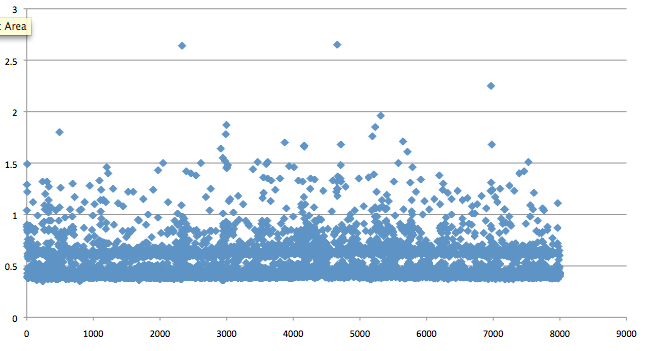
Notice the gap between 500 and 600 ms? I don't have an explanation for this but I suspected that Pg has an internal condition that triggers for actions that take 500ms or longer. Regardless, our primary expectations had been met. Whatever bottleneck 8.3 demonstrated when creating databases on a server with large quantities of existing small databases appears to be fixed in 9.0.
The next test was to run a similar sequence with our new application server. It offers an internal RESTful API using Sinatra and Sequel to provision and manage customer databases on shared servers. The results for this run were even more enlightening. Check out the stratification:
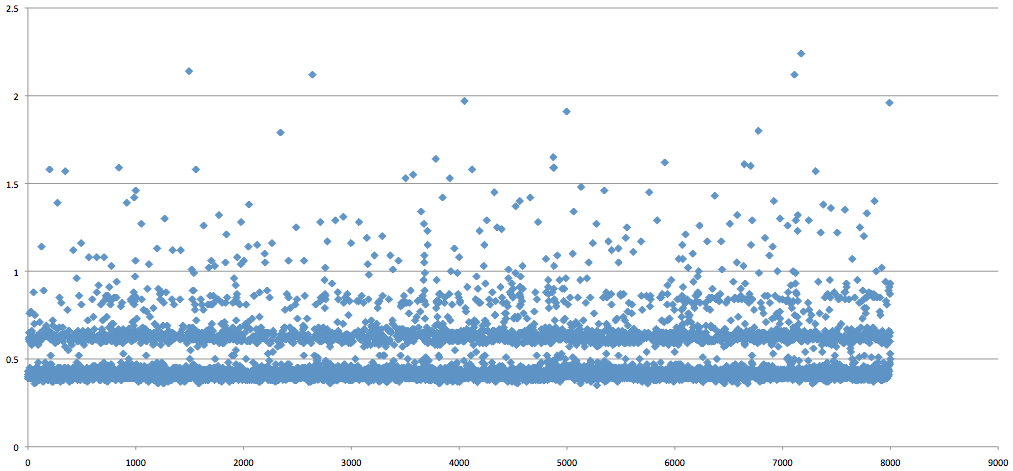
Not only is the initial gap (around 400ms) even more pronounced, but you can see a pattern of latency introduced at 200ms intervals after the initial 400ms delay. I have no explanation for this, but I wanted to publish these results and see if anyone else has a guess as to what might be causing these patterns.
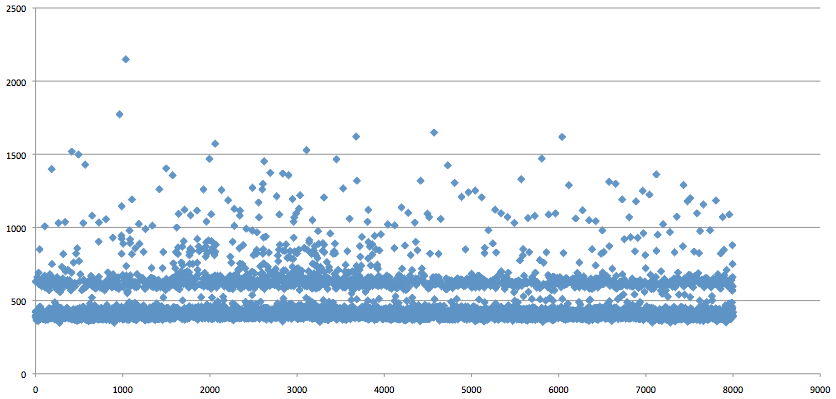
UPDATE: To rule out any distortion caused by GNU time, I ran another test using Ruby's Time class to get a more accurate representation. In the most simple terms, we start the clock with Time.now, connect to the database (no caching), create a role, create the database and stop the clock. Output is logged and then imported into Excel for plotting. I think the results speak for themselves (measured in milliseconds):
- Comments (1)
Achievement Unlocked: Heroku Operations
2011-07-11 11:59:56 by jdixon

I'm proud to announce that I'll be starting at Heroku in a couple of weeks. This is an exciting opportunity to work at a place that breathes DevOps and eats Infrastructure as Code. Whenever you hear someone describing "Platform as a Service", there's a good chance that Heroku will be the example they're talking about.
I first met Mark Imbriaco (@markimbriaco) when he was the Operations Manager at 37signals. Mark's a level-headed guy with a undeniable talent for Web Operations and an excellent track record for supporting his customers. It was no surprise to me when he took over as the Director of Cloud Operations at Heroku. Even after the acquisition by Salesforce.com last December, they've continued to innovate at a breakneck speed (proof here, here, here and here).
Heroku development and operations teams get to work on the sort of rapid scaling and engineering challenges that pique my interest. I'm doubly excited to be able to share the fact that I'll be joining up simultaneously with Curt Micol (@asenchi) as the newest Operations Engineers on Mark's team. It's an odd coincidence that we're both big fans of BSD. Hopefully nobody holds that against us. ;-).
Needless to say I'm thrilled about the whole thing and hope that it gives me more cool stuff to write about here. Stay tuned.
- Comments (2)

 RSS 1.0